May 12, 2026
Challenge Budget Approval Workflow – User Guide


1. Introduction
We are introducing a Challenge Budget Approval workflow for challenge creation and launch.
This workflow ensures that challenge prizes and copilot fees are reviewed and approved by a Project Manager before a challenge can be launched. The approval process improves budget visibility, governance, and control across projects.
The approval status is displayed directly in the Prizes & Billing section of the challenge.
Challenges can have one of the following Budget Approval Statuses:
Pending Approval
Approved
Rejected
Challenges cannot be launched unless the Budget Approval Status is Approved.
2. What This Means for Each User
The new workflow introduces changes for both Copilots and Project Managers.
2.1 For Copilots
As a copilot, you can continue managing challenge setup as usual.
What You Can Do
You can:
Create challenges
Add prizes and copilot fees
Save challenges as draft
View the Budget Approval Status in the Prizes & Billing section
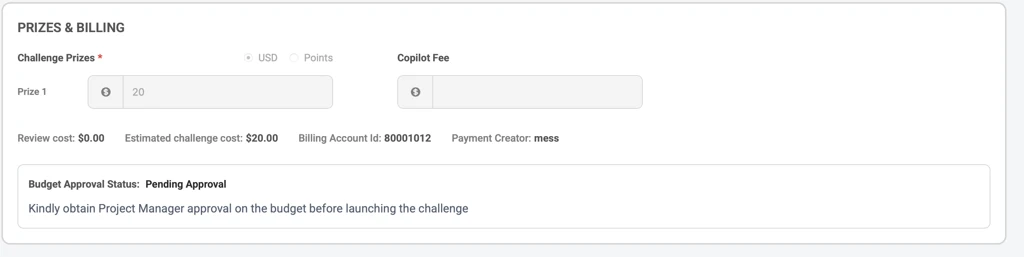
Budget Approval Statuses
Pending Approval
All newly created challenges default to Pending Approval.
While the challenge is in this state:
You can continue editing prizes and copilot fees
The challenge cannot be launched and launch button is disabled
Approved
Once a Project Manager approves the budget:
The Budget Approval Status changes to Approved
The challenge becomes eligible for launch and launch button is enabled.
The approver handle is displayed in the billing section
Rejected
If the budget is rejected:
The Budget Approval Status changes to Rejected
The challenge still cannot be launched and launch button stays disabled
The rejection reason becomes visible in the Prizes & Billing section
You can then:
Update prizes or copilot fees
Resubmit the challenge for approval
Any budget update automatically resets the status back to Pending Approval.
Important Behavior After Approval
If you modify:
Prize amounts
Copilot fee
After approval, the Budget Approval Status will automatically reset to Pending Approval.
The challenge must then be re-approved before launch.
What Happens After Launch
Once a challenge is launched:
Prizes and copilot fees become locked for copilots
Budget fields are no longer editable by copilots
Any budget changes must be handled by a Project Manager
During launch, you will also see the following notice:
“Prizes and copilot fees are locked after launch. Contact the Project Manager for any updates post-launch.”
2.2 For Project Managers
Project Managers are responsible for reviewing and approving challenge budgets before launch.
What You Can Do
Project Managers can:
Approve challenge budgets
Reject challenge budgets
View Budget Approval Status
Edit prizes and copilot fees after launch if needed
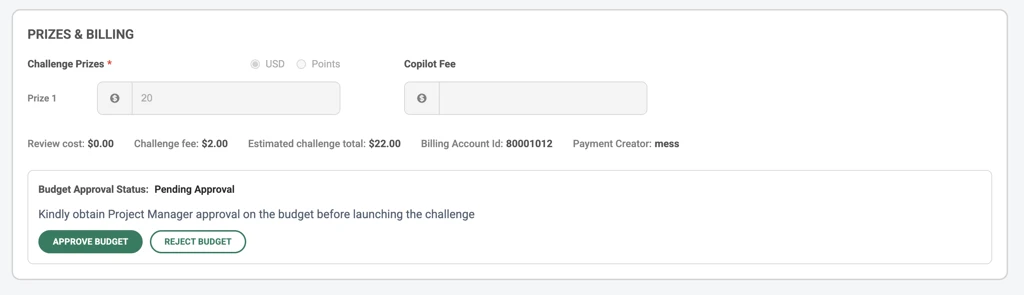
Approving a Challenge
When reviewing a challenge:
Navigate to the Prizes & Billing section
Review the proposed prizes and copilot fee
Approve the challenge budget
Once approved:
The Budget Approval Status changes to Approved
The challenge can now be launched by the copilot
Your handle is displayed as the approver
Rejecting a Challenge
Project Managers can also reject challenge budgets.
When rejecting:
A rejection reason is required
The rejection reason is stored and shown to the copilot
The copilot can then revise the budget and resubmit it for approval.
Budget Changes After Approval
If prizes or copilot fees are modified after approval:
The Budget Approval Status automatically resets to Pending Approval
The challenge must be reviewed and approved again before launch
Self-Approval
If a Project Manager creates the challenge themselves, they can also self-approve the budget.